

WebExtension.net
WebExtension.net
Toggle dark mode
WebExtension.net
WebExtension.net
taigi-sandhi-visualization

taigi-sandhi-visualization

View on Chrome Web Store
View taigi-sandhi-visualization Chrome Extension on Chrome Web Store
Add to bookmarks
0.0 (0 ratings)
0 views
This extension has been viewed 0 times
0 downloads
This extension has been downloaded 0 times

Data is synced from the Chrome Web Store. View the official store page for the most current information.

Highlights tone sandhi changes in Taiwanese romanization on the MOE dictionary site.
Type
Extension
Users
5 users
2
hey0wing
View author page of hey0wing
Published
Published on August 29, 2025
Version 1.6
Manifest version
3
Updated
Updated on January 7, 2026
productivity/education
Extension Category
View on Chrome Web Store
View taigi-sandhi-visualization Chrome Extension on Chrome Web Store
Share This Extension
Share on Twitter
Share on Facebook
Share on LinkedIn
Share on Reddit
Share on Bluesky
Share on Pinterest
taigi-sandhi-visualization Chrome Extension Image 1
taigi-sandhi-visualization Chrome Extension Image 2
taigi-sandhi-visualization Chrome Extension Image 3

Description

台語變調視像化 taigi-sandhi-visualization

A browser extension/userscript that highlights tone sandhi changes in Taiwanese Hokkien romanization on the MOE Taiwanese Dictionary.
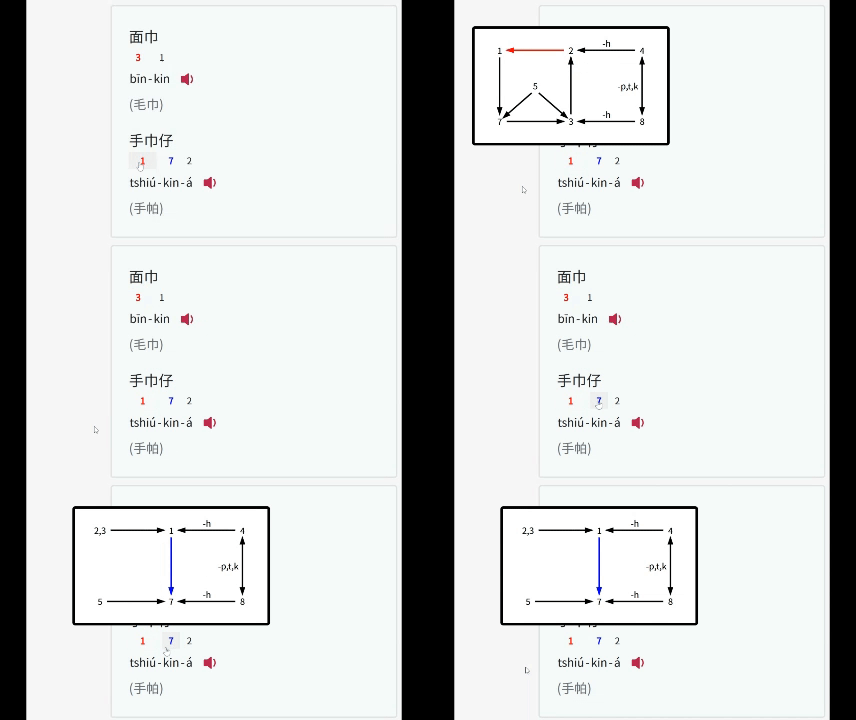
example

Features

  • Tone Sandhi Highlighting:
    • Automatically detects and highlights tone changes in Taiwanese romanization text on the MOE dictionary site.
    • Tone changes for every syllable except for the last one in a phrase.
    • Tone sandhi for three common accents (Referenced from link1, link2)
      • 南部腔 Southern (偏漳腔 Zhangzhou-leaning)
      • 北部腔 Northern (偏泉腔 Quanzhou-leaning)
      • 海口腔 Seaport / Coastal (泉州腔 Quanzhou)
  • Color Coding:
    • Red: Normal tone sandhi.
    • Blue: Tone sandhi before the suffix.
    • Green: Neutral tones.
  • Tooltips: Clicking a highlighted syllable to view the tone sandhi diagram.

Installation

Option 1: Browser Extension

Platform Supported Browsers Userscript Manager
Desktop Chrome, Brave, Safari, Firefox, Edge Tampermonkey, Violentmonkey, Greasemonkey
Android Firefox, Edge Tampermonkey, Violentmonkey
iOS Orion Userscript (Free), Tampermonkey (USD 2.99)

Option 2: Userscript Manager

Platform Supported Browsers Userscript Manager
Desktop Chrome, Brave, Safari, Firefox, Edge Tampermonkey, Violentmonkey, Greasemonkey
Android Firefox, Edge Tampermonkey, Violentmonkey
iOS Safari Userscript (Free), Tampermonkey (USD 2.99)
  1. Add the Userscript:
    • Greasy Fork (Recommended): Click Here and install the script directly by clicking "Install this script".
    • Otherwise, copy the script directly from taigi-sandhi-visualization.user.js, and paste the code.
  2. Install via Userscript Manager:
    • Follow the Greasy Fork tutorial to install one.
      • Or install Tampermonkey (Recommended), Violentmonkey or Greasemonkey on your own

Planned Improvements

  • Add Chao's Tone letter / Pitch contour for visualization
    • Real-time audio conversion(?)

Credits

License

This project is licensed under the MIT License.

© 2026 WebExtension.net. All rights reserved.
Disclaimer: WebExtension.net is not affiliated with Google or the Chrome Web Store. All product names, logos, and brands are property of their respective owners. All extension data is collected from publicly available sources.
Go to top

