


Data is synced from the Chrome Web Store. View the official store page for the most current information.


A browser extension/userscript that highlights tone sandhi changes in Taiwanese Hokkien romanization on the MOE Taiwanese Dictionary.
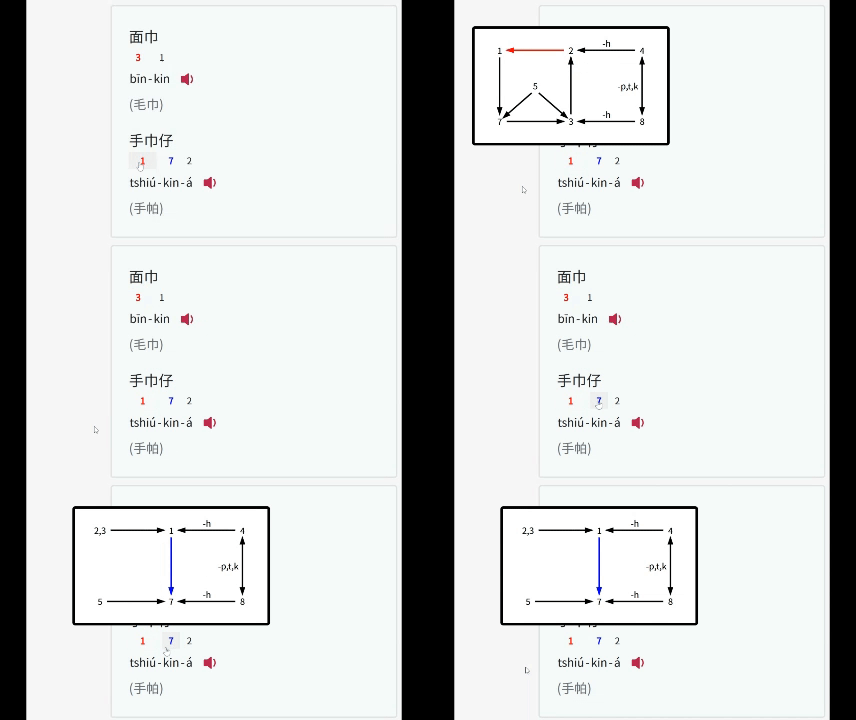
-á suffix.| Platform | Supported Browsers | Userscript Manager |
|---|---|---|
| Desktop | Chrome, Brave, Safari, Firefox, Edge | Tampermonkey, Violentmonkey, Greasemonkey |
| Android | Firefox, Edge | Tampermonkey, Violentmonkey |
| iOS | Orion | Userscript (Free), Tampermonkey (USD 2.99) |
| Platform | Supported Browsers | Userscript Manager |
|---|---|---|
| Desktop | Chrome, Brave, Safari, Firefox, Edge | Tampermonkey, Violentmonkey, Greasemonkey |
| Android | Firefox, Edge | Tampermonkey, Violentmonkey |
| iOS | Safari | Userscript (Free), Tampermonkey (USD 2.99) |
taigi-sandhi-visualization.user.js, and paste the code.This project is licensed under the MIT License.
Track and analyze Chrome Web Store extensions with comprehensive analytics and insights.

